
If you run a small business and you’ve been told that writing blog posts for SEO is the key to getting found on Google, you’re not wrong — but you’ve probably also felt completely overwhelmed trying to figure out where to start. What keywords should you target? How long should the post be? How often should you publish? What the heck is a meta description? This guide is written specifically for small business owners who want clear, practical answers without having to wade through technical jargon or spend thousands of pounds on an SEO agency.
This isn’t a theoretical overview. Every step in this guide is something you can apply to your very next blog post. You’ll understand not just what to do, but why it works — which makes a huge difference when you’re making decisions on your own without a dedicated marketing team behind you.
If you’re looking for a deeper dive into advanced SEO blog writing strategy, our Complete Guide to SEO Blog Writing covers topics like E-E-A-T, featured snippets, and meta description optimization in significant depth. This article focuses on the practical writing process itself — the decisions you make before you type the first word, and the steps you follow from blank page to published post.
The nine steps below represent the exact workflow to follow every time you sit down to create content. By the end, writing blog posts for SEO will feel less like guesswork and more like a repeatable system with predictable results.
Why Writing Blog Posts for SEO Is One of the Smartest Things a Small Business Can Do
Let’s talk money for a second. Paid advertising — Google Ads, Facebook Ads, sponsored posts — works while you’re paying for it. The moment you stop, the traffic stops. It’s a tap, not a pipeline. Writing blog posts for SEO is fundamentally different because the content you publish today can continue attracting visitors twelve, eighteen, even thirty-six months from now without any additional spending.
Here’s what actually happens when you build a consistent SEO blog strategy. Each post you publish becomes an independent page that Google can rank for its own set of keywords. One post might rank for 3 different search queries. Another might pull in traffic from 15 variations of a phrase. Over time, these posts form a web of interconnected content that collectively drives far more traffic than any single page ever could. Marketers call this the compounding effect of content — and it’s the reason blogs consistently outperform paid channels in long-term ROI studies.
The other advantage? Google actually wants small, specialist businesses to rank. An independent plumber who writes a genuinely helpful article explaining why boilers lose pressure has something large corporate sites often lack: specific, practical, first-hand knowledge. That kind of content depth is exactly what Google’s quality guidelines reward. You don’t need a massive domain authority to compete — you need well-targeted, well-written content that genuinely answers what your customers are searching for.
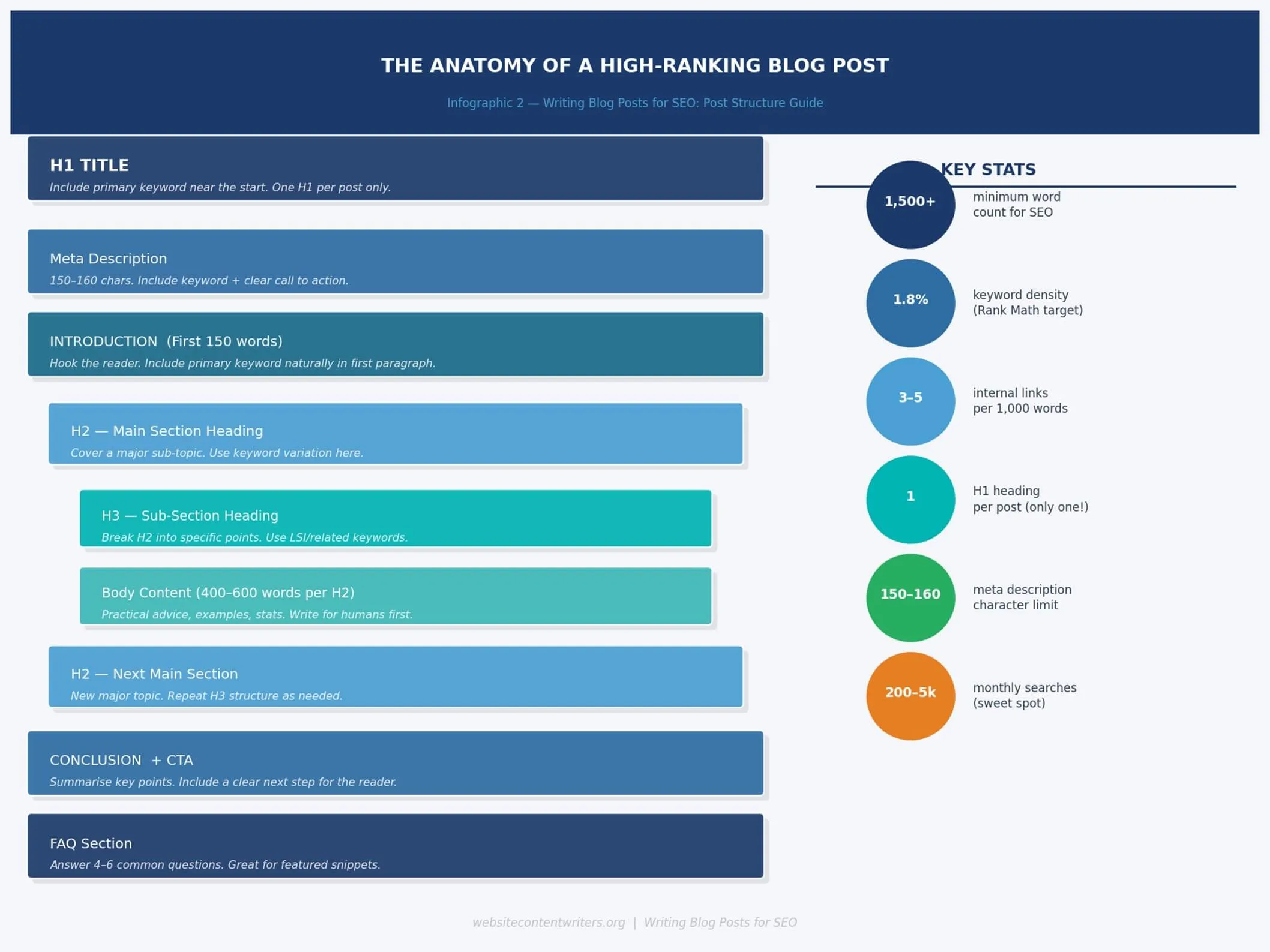
The anatomy of a high-ranking SEO blog post. Use this as a structural template every time you write.
Step 1: Choosing Keywords That Small Businesses Can Actually Rank For
The number one mistake small business owners make when writing blog posts for SEO is targeting keywords that are simply impossible to rank for. Typing “SEO tips” into Google returns results from Ahrefs, Moz, Search Engine Journal, and HubSpot. You’re not going to beat those sites with a fresh blog. But you absolutely can rank for something like “SEO tips for local plumbing businesses” — because almost nobody is competing seriously for that phrase, yet real people are searching for it.
The Long-Tail Keyword Advantage
Long-tail keywords are phrases of three words or more that target a specific topic or question. They tend to have lower search volumes — but that’s not a weakness, it’s a strategic opportunity. A keyword receiving 400 searches per month that you rank #1 for will drive far more traffic than a keyword receiving 40,000 monthly searches that you rank #94 for.
For small businesses writing blog posts for SEO, the sweet spot is typically keywords receiving 200 to 5,000 searches per month, with low to medium competition. Here’s how to find them using free tools:
- Google Keyword Planner — search your broad topic and review the related keyword suggestions. Filter by average monthly searches (200–5,000) and look for phrases with low competition.
- Google’s “People Also Ask” box — search your topic and check the expandable question boxes that appear. Every single one of those questions has confirmed search demand and could become a blog post title.
- Ubersuggest (free tier) — type in a competitor’s URL to see what keywords they rank for. This is a fast way to find topic ideas that are proven to drive traffic in your niche.
- Google Search Console — if your site has been live for a while, this is gold. Go to Performance → Search Queries to see what phrases people are already using to find you, then write posts that target those terms more directly.
- Answer the Public — enter a broad topic and receive a visual map of every question people ask around that subject. Fantastic for identifying FAQ-style post ideas.
Once you’ve found a candidate keyword, ask yourself three questions: Does it have search volume (200–5,000/month)? Is the competition manageable (check whether the top 10 results are dominated by huge brands)? Does it match a question your customers actually ask you? If all three answers are yes, you’ve found your keyword.
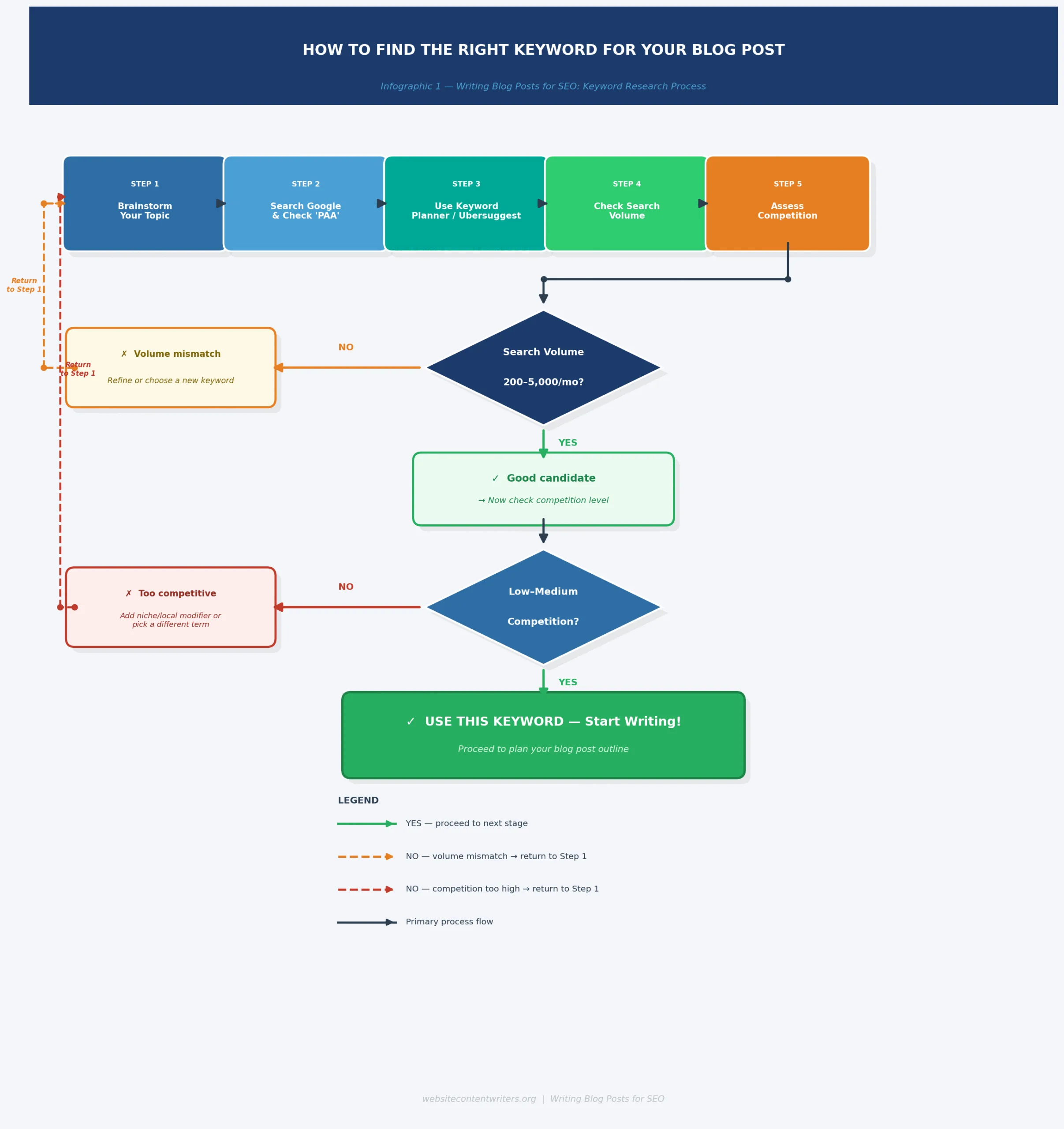
Use this decision flowchart to evaluate any keyword before committing it to a blog post.
Step 2: Understanding Search Intent (Why This Changes Everything)
Here’s something that trips up a lot of small business owners when they start writing blog posts for SEO: they find a keyword with solid search volume, write a detailed article, publish it — and nothing happens. Often the culprit isn’t the quality of the writing. It’s a mismatch between the type of content they wrote and what Google knows searchers actually want.
Search intent is simply the underlying reason someone types a query into Google. Before writing a single word, spend 60 seconds searching your target keyword and studying the top 5 results. Google has already done the research into what format works best for that query — your job is to understand and then outperform what’s already there.
The Four Types of Search Intent
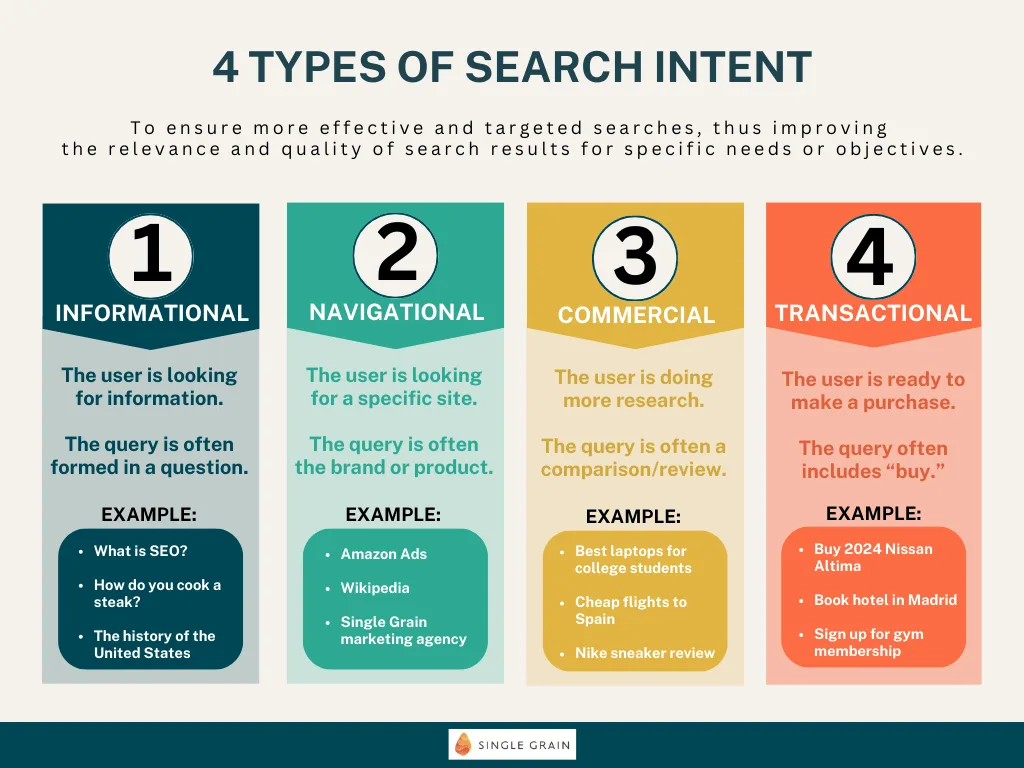
- Informational: “How do I…” / “What is…” / “Why does…” — the searcher wants to learn. Write an educational guide, how-to, or explainer.
- Navigational: The searcher is looking for a specific website or page. Rarely applicable to blog content.
- Commercial: “Best X for Y” / “X vs Y” / “Top 10 X” — the searcher is researching options. Write a comparison guide or curated list.
- Transactional: “Buy X” / “X price” / “X near me” — the searcher is ready to act. This is where your service pages come in, not blog posts.
A practical check: if the top 10 results for your keyword are all step-by-step guides, don’t write a product comparison — write a step-by-step guide. If they’re all listicles, write a listicle. If they’re all in-depth tutorials running 3,000+ words, a 600-word overview is not going to outrank them no matter how good the writing is.
Quick intent check: Search your keyword right now. Look at the top 5 results. Write down the format (list, guide, comparison, how-to). That’s your template.
Step 3: Planning Your Blog Structure Before You Write a Word
One of the most underrated habits among experienced SEO blog writers is spending 10–15 minutes planning a post’s outline before writing. It feels like procrastination. It isn’t. A clear structure solves two important problems simultaneously: it makes the writing process faster, and it ensures search engines can easily understand and index everything your post covers.
Building Your Heading Hierarchy
Every blog post follows the same structural logic: one H1 (your title), multiple H2 sections (the main chapters), and H3 sub-sections beneath each H2. Think of it like a book: the H1 is the book title, H2s are the chapters, H3s are the sections within each chapter. Search engines use this hierarchy to understand your content’s scope. Readers use it to scan and navigate.
When planning your headings, try to naturally include your primary keyword or a close variation in your H1 and at least one H2. You don’t need to force it into every heading — in fact, doing so looks unnatural and hurts readability. The goal is to signal relevance to Google while making the structure easy for a human reader to follow.
How to Build Your Outline in Practice
Here is an easy way you can create your outline when writing blog posts for SEO:
- Open a blank document and write your H1 title with the primary keyword included.
- List 4–7 H2 sections that together cover the topic comprehensively. Ask yourself: what questions would a complete beginner need answered about this subject?
- Under each H2, note 1–3 H3 sub-points or examples you’ll expand on.
- Identify where each infographic, image, or example will sit.
- Check that the outline, read top to bottom, tells a coherent story with a clear beginning, middle, and end.
This outline becomes your writing roadmap. You’re no longer staring at a blank page wondering what to write next — you’re just filling in the sections you’ve already defined.
Step 4: Writing the Blog Post — Content That Ranks and Reads Well
Once your outline is ready, writing blog posts for SEO becomes a much more focused exercise. You know your keyword, you know the intent, and you have a structure to follow. Now the job is to fill that structure with content that is genuinely better than what currently ranks for your target keyword.
Writing an Introduction That Keeps Readers on the Page
When writing blog posts for SEO, your introduction has two jobs: hook the reader, and tell Google what the article covers. The most reliable formula for small business blogs is the PAS opening — Problem, Agitate, Solution. Start by naming the reader’s specific problem. Expand briefly on why it’s frustrating or costly. Then explain what this article will do to solve it. Keep your intro to 150–200 words maximum. Readers who came from Google already know they’re interested — they need confirmation that this specific article is worth their time, not a five-paragraph preamble.
Importantly, your primary keyword should appear naturally within your first 100–150 words. This isn’t about tricking Google. It’s about confirming to the algorithm (and to skimming readers) that this page is genuinely about what the title promises.
Body Content: How to Write with Depth and Authority
The single most important thing that separates content that ranks from content that doesn’t is depth. Not word count — depth. A 3,000-word article that keeps saying the same things in different ways will not outrank a 2,000-word article that covers genuinely new ground with specific, actionable information.
Here’s a practical test: after writing each section, ask yourself, “Does this section answer a question my ideal customer has actually asked me?” If the answer is no, either cut the section or replace it with content that does. Real examples, specific numbers, named tools, and honest caveats all signal to Google (and readers) that the person writing has genuine experience with the subject.
Keep your paragraphs to 2–4 sentences. Use bullet points and numbered lists when presenting a series of items rather than trying to cram everything into a single run-on sentence. End each major section with a brief summary or a natural transition into the next section — this improves reading flow and reduces bounce rates, both of which influence how Google rates your content quality over time.
For practical tips on making AI-assisted drafts sound human and pass quality checks, our guide on how to optimize AI-generated content for SEO walks through the editing process in detail.
Step 5: Keyword Placement and Hitting Your Rank Math SEO Target
If you’re using Rank Math SEO (one of the most popular WordPress SEO plugins for small businesses), you’ll see a keyword density score in the analysis panel. The recommended target is 1.8% keyword density for your primary keyword. This sounds technical, but the calculation is straightforward: for a 3,000-word article, a 5-word primary keyword like “writing blog posts for SEO” needs to appear approximately 13–14 times throughout the post to hit the 1.8% mark.
That sounds like a lot until you realize how many natural opportunities arise in a well-structured guide: in the title, the introduction, a heading, the opening of several sections, an internal link anchor, and the conclusion. Write naturally and check the count at the end rather than counting as you write — the latter produces stilted, unnatural prose that reads exactly like what it is: keyword-stuffed content.
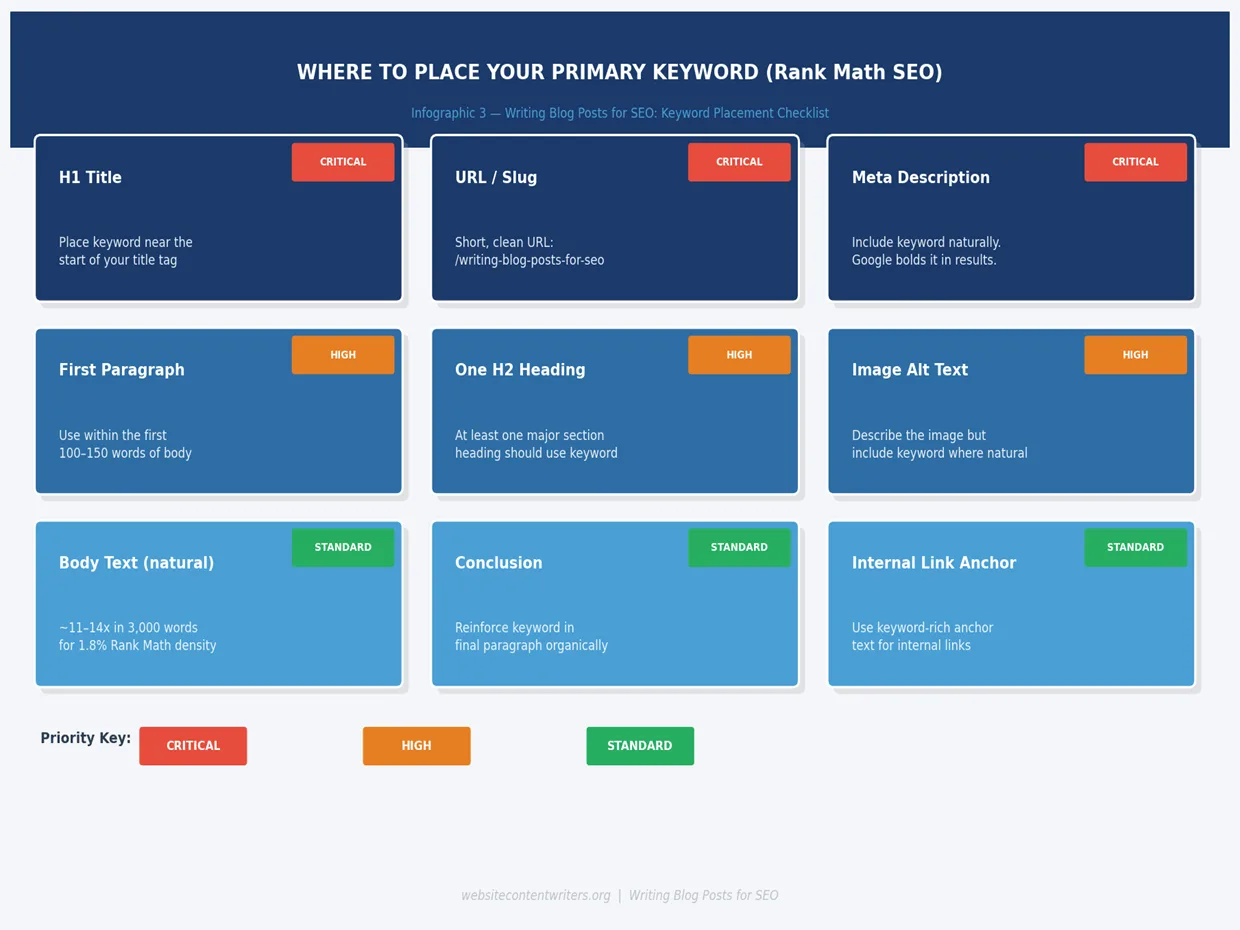
Use this placement map to ensure your keyword appears in every high-value location Google evaluates.
Using Secondary and Supporting Keywords Naturally
Beyond your primary keyword, your article should naturally contain semantic variations and related phrases. For this article, those include: “writing SEO blog posts”, “SEO blog writer”, “SEO article writing tools”, and “SEO blog writing service”. You don’t need to force these in — if you’re covering the topic thoroughly, they’ll appear organically. They help Google understand the full context of your article beyond the single primary keyword, and they signal that your content around writing blog posts for SEO covers the subject at depth rather than just repeating one phrase.
Rank Math will also prompt you to use your focus keyword in: your SEO title, the URL slug, the meta description, the first paragraph, at least one subheading, and image alt text. Each of these placement points is confirmed in the Infographic above. Tick them off in Rank Math’s analysis panel before publishing.
Rank Math Density Check: After writing, paste your article into a word processor. Use Find (Ctrl+F) to count exact keyword occurrences. Divide by total word count, multiply by 5 (for a 5-word phrase), multiply by 100. Target: 1.8%.
Step 6: Internal Linking — the Simple Strategy Most Small Business Blogs Get Wrong
Internal links are hyperlinks that connect one page on your website to another page on your same website. They’re one of the most powerful tools available when writing blog posts for SEO — and one of the most consistently overlooked by small business owners. Every time you publish a new post without linking it to related existing content, you’re leaving ranking potential on the table.
Why Internal Links Matter for Your Rankings
Search engine crawlers discover pages by following links. A page with no internal links pointing to it (called an “orphan page”) is harder for Google to find and index. Internal links also distribute what SEO professionals call “link equity” — the ranking authority that flows from one page to another. When a high-traffic post on your site links to a newer, lower-traffic post, it shares some of its authority with that newer page, helping it rank faster.
There’s also a direct user experience benefit. A reader who arrives on your post about writing blog posts for SEO might also want to know about the best AI writing tools available to help them. If you link to that content, you keep that reader on your site longer — which is a positive engagement signal that Google monitors when evaluating content quality.
A Simple Internal Linking Framework for Every Post
- Link to 2–3 existing posts that are topically related to the article you just wrote. Use descriptive anchor text (e.g. “our guide on keyword research” rather than “click here”).
- After publishing, update 1–2 older posts to add a link to your new article where it fits naturally. This ensures no post sits as an orphan.
- Prioritize linking to your most important service pages and your free tool/CTA pages from within your highest-traffic posts.
- Keep anchor text varied — don’t use the identical anchor text phrase on every internal link to the same page. Google can interpret this as manipulative.
For this post, relevant internal links might include our guide to SEO blog writing, our review of the best AI writing tools in 2026, and our free AI article generator for businesses that want to start producing content immediately.
Step 7: Images, Alt Text, and Visual SEO — What Actually Matters
Images make blog posts more engaging and help break up long sections of text. But from an SEO perspective, what matters most isn’t the image itself — it’s how you describe it. Search engines cannot see images; they read the alt text (alternative text) attribute you assign to each image, and they check the file name of the image itself.
Three Image SEO Rules Worth Following
The three critical image rules you must follow when writing blog posts for SEO are:
- Write descriptive alt text: Your alt text should accurately describe what’s in the image while naturally incorporating your target keyword where relevant. For example, the keyword placement infographic in this post has the alt text: “Keyword placement map — where to place your primary keyword when writing blog posts for SEO”. Clear, descriptive, and keyword-relevant.
- Rename image files before uploading: “infographic-keyword-placement-writing-blog-posts-seo.png” will outperform “IMG_4823.png” every single time. This is a 10-second task that compounds across every image you ever upload.
- Compress images before uploading: Page speed is a confirmed Google ranking factor. A 4MB PNG image will slow your page load significantly. Use a free tool like TinyPNG or Squoosh to compress images to under 200KB without visible quality loss.
Infographics specifically are worth the extra effort to create or commission. They are among the most-shared content formats online — meaning other sites are more likely to embed or link to a blog post that contains an original, useful infographic. Every external site that links to your article (a “backlink”) adds to your domain’s overall authority, which feeds back into how well all your content ranks.
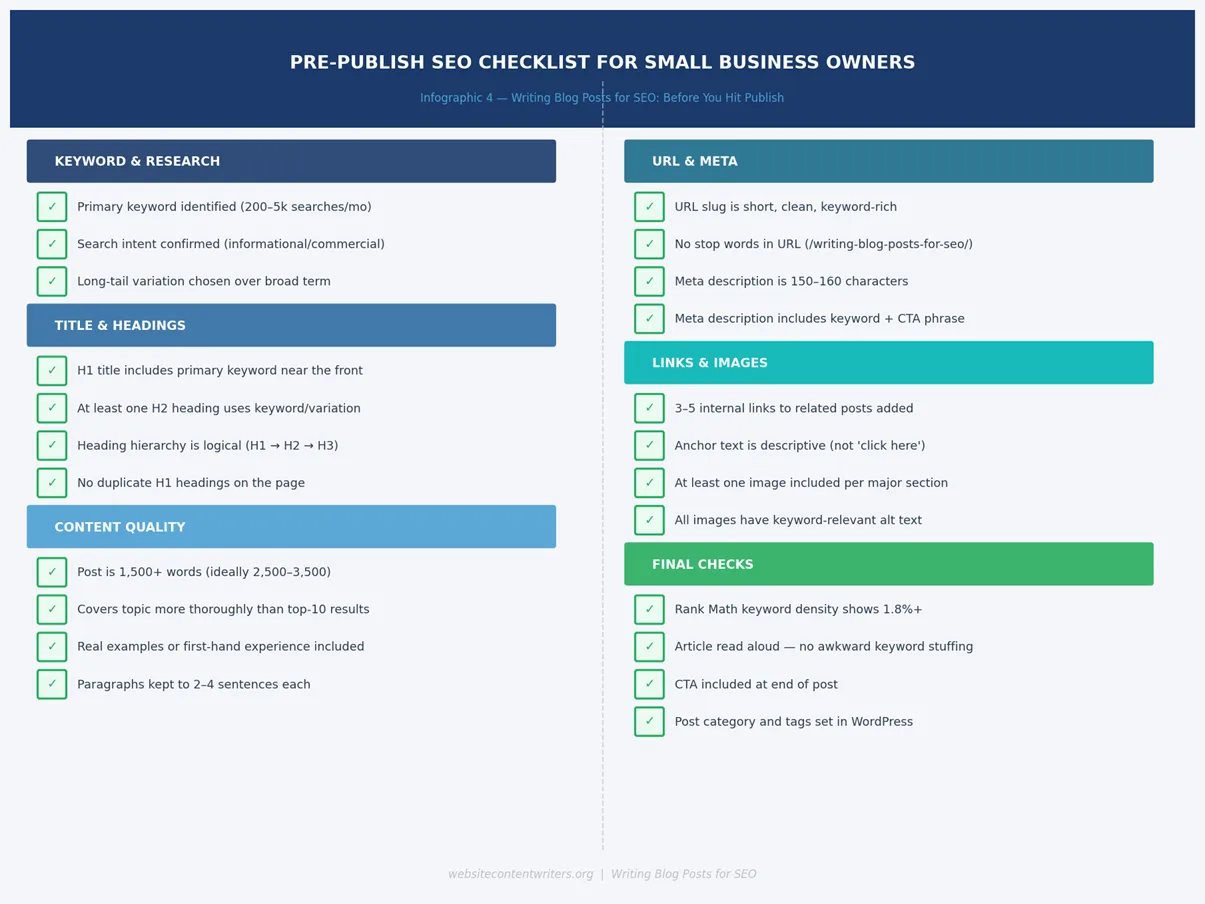
Run through this pre-publish checklist before every post goes live. It takes under five minutes.
Step 8: The Pre-Publish Process — Rank Math Checks and Final Quality Review
Before you hit publish, do a systematic review rather than just re-reading for typos. The infographic above covers the full checklist, but here’s how to use Rank Math SEO plugin to validate your writing blog posts for SEO setup within WordPress specifically.
Using Rank Math SEO to Validate Your Post
Rank Math provides a real-time score panel (typically in the right sidebar of the WordPress block editor) that checks your content against a range of SEO factors. Aim for a score of 80 or above before publishing. The specific checks that matter most:
- Focus Keyword in Title: Rank Math will confirm whether your H1 contains the focus keyword. If not, rewrite your title.
- Focus Keyword in Meta Description: Enter your custom meta description in the Rank Math meta box. Keep it 150–160 characters with the keyword present.
- Focus Keyword in URL: Edit your post slug (the URL ending) to match your keyword: /writing-blog-posts-for-seo-guide
- Keyword Density: Rank Math will display your current density. Target the range it marks as green — typically 1.0%–2.5%. Under 0.5% means the keyword barely appears; over 3% risks looking spammy.
- Content Length: Rank Math checks whether your post meets a minimum word count. Aim for 2,500–3,500 words for competitive keywords.
- Internal and External Links: Rank Math flags posts with no internal or no external links. Both should be present.
- Image Alt Text: Rank Math checks whether your first image’s alt text contains the focus keyword. Verify this manually for all images.
Common Mistakes That Kill Your SEO Rankings (and Exactly How to Fix Them)
After years of helping small businesses improve their content, the same six mistakes appear consistently in underperforming blogs. Understanding these pitfalls is just as important as knowing the correct steps — because even technically sound writing blog posts for SEO can fail to rank if one of these six errors is present. The good news: every single one is fixable. The Infographic below maps each mistake directly to its solution.
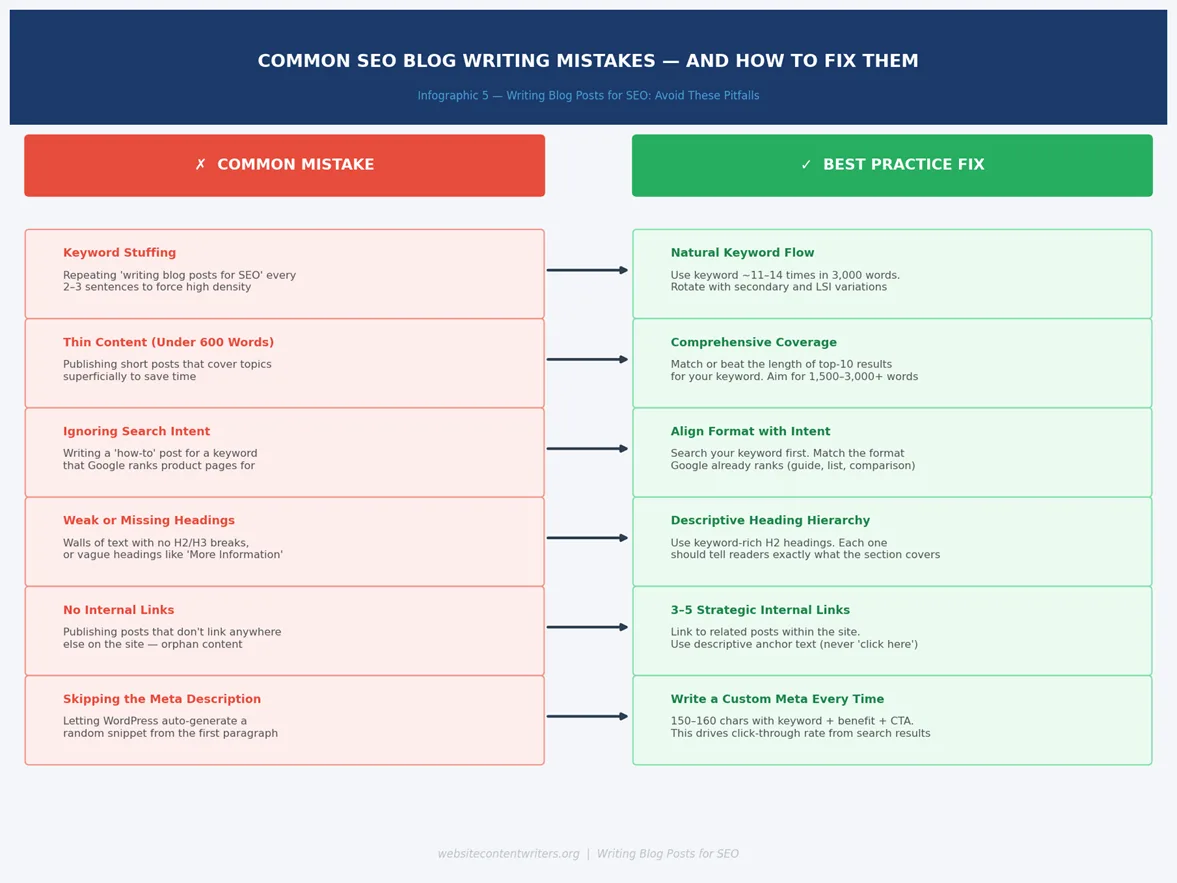
The six most common mistakes that prevent blog posts from ranking — and exactly how to fix each one.
The most damaging mistake in writing blog posts for SEO, by far, is publishing thin content — articles under 800 words that only skim the surface of a topic. Google’s quality guidelines make clear that content should leave the reader better informed than they were before reading it. A 400-word post on a competitive topic will almost never rank because it simply cannot contain as much useful, specific information as the 2,500-word comprehensive guides already ranking in positions 1–5.
The second most common issue is ignoring search intent, which we covered in Step 2. It’s worth repeating because it’s so often the hidden reason a well-written, well-optimized post still doesn’t rank. If you’re writing a guide when Google wants to show a product list, no amount of keyword optimization will overcome the mismatch.
The Best SEO Article Writing Tools for Small Business Owners
Good SEO article writing tools don’t replace good writing — they make the writing and optimization process faster and more consistent. Here are the tools that provide the most value for small business owners specifically, organized by what stage of the writing process they help with.
Keyword Research Tools
- Google Keyword Planner (free) — the most reliable source of actual search volume data. Requires a Google Ads account (free to set up, no spend required).
- Ubersuggest (free tier available) — excellent for competitor keyword analysis and discovering long-tail variations.
- AnswerThePublic (free tier) — generates question-based keyword ideas that are ideal for FAQ sections and featured snippet targeting.
On-Page SEO and Optimization Tools
- Rank Math SEO (free WordPress plugin) — Real-time SEO analysis built into the WordPress editor. Checks keyword placement, density, meta tags, readability, and more.
- Yoast SEO (free WordPress plugin) — Similar to Rank Math. Choose one or the other; running both simultaneously is redundant.
- Google Search Console (free) — Essential for monitoring how your posts perform after publishing. Shows keyword rankings, click-through rates, and indexing status.
Writing and Efficiency Tools
AI writing assistants have become a core part of many small business content workflows. Used correctly — as a drafting aid rather than a replacement for human expertise and editing — they can dramatically reduce the time it takes to produce a first draft. For a comprehensive comparison of the leading options, see our guide to the best AI writing tools in 2026.
The key principle when using any AI tool for writing blog posts for SEO is this: treat the output as a first draft, not a finished product. Every AI-generated article needs human editing to add specific examples, verify accuracy, match your brand voice, and ensure the keyword strategy is properly executed.
Step 9: Publishing, Monitoring, and Updating Your Posts over Time
Publishing your post is the beginning of the process, not the end. Most blog posts take 3 to 6 months to reach their peak rankings — Google needs time to crawl, index, and assess your content against the competition. During that period, there are two things worth doing consistently.
Monitoring Performance with Google Search Console
Connect your site to Google Search Console (it’s free) and check the Performance report monthly. Look at three metrics for each post: total impressions (how often you appear in results), average position (your ranking), and click-through rate (CTR — percentage of impressions that result in a click). A post with high impressions but low CTR usually means your title or meta description needs rewriting to be more compelling. This monitoring habit is what separates businesses that get long-term results from writing blog posts for SEO from those who publish and forget.
When and How to Update Your Posts
Posts ranking in positions 8–20 are the highest-priority candidates for updates. They’re close to page one but need a push. Common updates that improve rankings include:
- Adding 300–500 words of new, specific information to thin sections
- Refreshing any statistics or data that are more than 18 months old
- Adding internal links to newer posts you’ve published since the original was written
- Improving the introduction using the PAS formula described in Step 4
- Adding an FAQ section targeting related question-based keywords
A quarterly review of your 10 most-visited posts is usually sufficient for a small business blog. Set a calendar reminder, spend 30–60 minutes per post, and track whether positions improve over the following 6–8 weeks.
When to Use an SEO Blog Writing Service
Everything in this guide is genuinely doable as a solo business owner — but we’d be doing you a disservice if we didn’t acknowledge the reality: most small business owners don’t have the time to consistently execute all of this. Researching keywords, structuring posts, writing 2,500 words of quality content, optimizing for Rank Math, adding internal links, sourcing images, and monitoring performance every week is roughly 6–10 hours of work per post for someone who isn’t doing it daily.
That’s where working with a professional SEO blog writing service becomes a practical business decision rather than an extravagance. The right service handles the entire workflow — from keyword research to published, optimized post — while you focus on actually running your business.
What to Look for in an SEO Blog Writing Service
Here are a few points to consider when looking for a service that offers writing blog posts for SEO:
- Keyword research included: The service should perform keyword research on your behalf, not just write to whatever you specify. Topic ideas from clients are valuable starting points, but professional selection makes the difference between a post that ranks and one that doesn’t.
- Rank Math / Yoast optimization: Any content created should be optimized to hit the target density and checklist items within your chosen SEO plugin — not just “SEO-friendly” in a vague, unverifiable sense.
- Human-edited output: AI-assisted drafting is now standard practice and perfectly acceptable — but a quality service will always include a human editing stage to ensure accuracy, brand voice, and natural language.
- Consistent publishing schedule: One of the biggest drivers of blog success is publishing frequency. A service that can commit to a consistent weekly or bi-weekly schedule delivers more compounding value than irregular bursts of content.
- Internal linking strategy: The best SEO blog writing service providers understand your existing content and incorporate relevant internal links — not just placeholder text.
Website Content Writers combines AI-assisted content creation with human editorial oversight to produce keyword-optimized, Rank Math-ready blog posts for small businesses at a fraction of the cost of a traditional agency. If you’re ready to start writing blog posts for SEO consistently without clearing your schedule to do it, try our free AI article generator and see a fully formatted, SEO-optimized first draft in minutes.
Frequently Asked Questions About Writing Blog Posts for SEO
Here are some common FAQs that need to be answered in detail about writing blog posts for SEO:
How long should a blog post be for SEO?
There’s no universal magic number, but most competitive topics require at least 1,500 words to rank on page one, and posts between 2,000 and 3,500 words tend to perform best across a wide range of industries. The practical rule: check the word count of the top 5 results for your target keyword, then aim to match or exceed the average while maintaining quality throughout. Never pad your post with filler just to hit a word count — Google’s quality systems are increasingly good at identifying content that says little over a large word count.
How often should small businesses publish SEO blog posts?
Consistency matters more than volume. Publishing one well-optimized post per week will outperform five rushed posts every Monday followed by nothing for a month. A realistic and sustainable schedule for most small businesses is 2–4 posts per month, each properly researched, structured, and optimized. As your content library grows and you become more efficient at the process, you can increase frequency.
What is keyword density and how do I calculate it for Rank Math?
When writing blog posts for SEO your keyword density is the percentage of your total word count that consists of your focus keyword. Rank Math calculates it as: (number of keyword occurrences × keyword word count) ÷ total word count × 100. For a 5-word keyword in a 3,000-word article appearing 13 times: (13 × 5) ÷ 3000 × 100 = 2.17%. Rank Math’s recommended range is 1.0%–2.5%, with 1.8% being the widely cited target. Aim for this range as a guideline, not an obsession — natural, readable writing always takes priority.
Can I use AI tools to write blog posts for SEO?
Yes — and many successful small business blogs now use AI tools as part of their content workflow. Google’s guidance is clear: AI-generated content is acceptable as long as it meets their quality standards (helpful, accurate, written for people). The key is to treat AI output as a first draft that requires human editing, factual verification, and keyword strategy review before publishing. AI tools excel at generating structure and initial prose quickly; humans excel at adding specificity, accuracy, and brand voice. Combining both is currently the most efficient approach for quality writing blog posts for SEO at scale.
Does Google penalize duplicate content between blog posts on the same site?
Google doesn’t issue formal penalties for duplicate or overlapping content, but it will choose which version to rank and may suppress the others. If two posts on your site target the same keyword and cover very similar ground, they compete against each other — a problem called “keyword cannibalism.” The solution is to give each post a clearly distinct angle, target a meaningfully different keyword, or consolidate two underperforming overlapping posts into one comprehensive article.
Start Writing Blog Posts for SEO: Your Next Steps
The process of writing blog posts for SEO can feel complicated when you look at everything at once — keyword research, intent matching, structure, keyword placement, internal linking, image SEO, Rank Math optimization, monitoring. But every professional SEO blog writer started exactly where you are now, and the process becomes faster and more instinctive with every post you write.
Start with one post. Pick a long-tail keyword your customers are genuinely searching for. Structure your outline before writing. Write content with real depth — specific examples, actual numbers, practical steps. Check your Rank Math score before publishing. Add 3–5 internal links. Then monitor performance monthly and update every quarter. That’s the entire system. It works because it’s built on what Google actually rewards.
If you want to shortcut the most time-intensive parts of the process, Website Content Writers gives small business owners a way to produce keyword-optimized, Rank Math-ready blog posts without clearing their diary. The platform combines AI efficiency with human-quality editing to handle the heavy lifting so you can focus on growing your business and not just writing blog posts for SEO.